Western NY Nocturnal Bird Migration Study
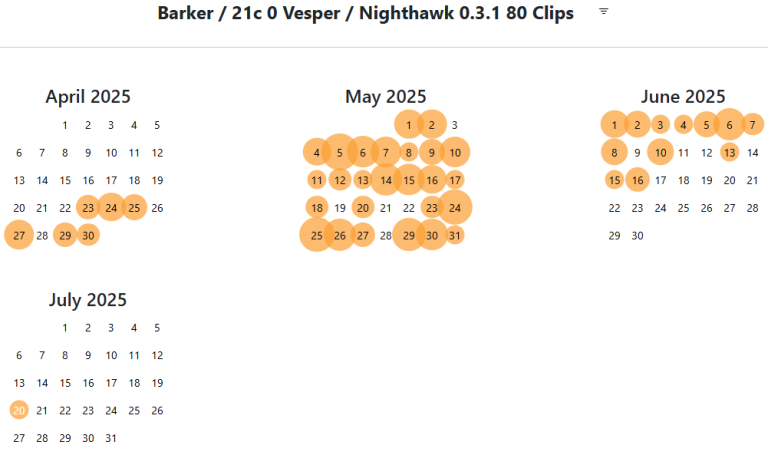
{If viewing on a smartphone, swipe left to center calendar)
From mid-April through mid-June, the archive acquired bird calls from 11 stations in the Western NY transect via two different automatic bird call detectors, Tseep-r and Nighthawk-0.3.1. From mid-July through mid-October, the archive will be acquiring calls of six speces of birds from five stations using the Nighthawk-0.3.1 bird call detector -- weekly call totals are graphically updated under the Data link in the page menu.
Tseep-r detects short bursts of acoustic energy in the 5-10 kHz frequency band. These are typically short high pitched calls analagous to a single cricket chirp. This program detects most warbler and sparrow night flight calls, but it also detects raindrops and other environmental noises. All Tseep-r detections came into the archive in near real-time during the night and there were typically many non bird call detections. The bird calls were manually extracted from the false detections (and later will be classified to species) by a person with such skills. Call extraction was completed by ~6 am edt each morning. On coastal megaflight nights, the analysis occasionally occured hour-to-hour during the night, and a text alert was available for when large flights were underway.
Nighthawk-0.3.1 is a machine learning program that is very good at automatically detecting calls of certain species of birds, in many cases with few false detections. Nighthawk begins processing calls in the audio recording from the previous night shortly after it the recording is completed (7am edt each morning). It finishes about 3 hours later and sends the identified call clips to the archive. We have modified the program to automatically report the following six species to the archive: Dickcissel (DICK), Grasshopper Sparrow (GRSP), Black-and White Warbler (BAWW), Canada Warbler (CAWA), Least Sandpiper (LESA) and Upland Sandpiper (UPSA). All Nighthawk detections are automatically classified to species and enter the archive as such. These "machine" classifications are periodically proof checked by human inspection and incorrect identifications are reclassified as Noise or Other sounds.
When first entering the archive, a calendar appears with orange circles indicating nights with Tseep-r detected bird calls from a single monitoring station (gray circles indicate nights with no calls). The station name is indicated at the beginning of the page title and the name of the detector used to extract the calls is toward the end of page title. A date with an orange circle indicates that at least one call was detected that night (size of orange circle reflects the number of calls or detections). Clicking on one of the orange circles in the calendar opens an album of the detections for that night at that station. The album shows a spectrogram for each detection... a visual representation of the sound energy with time on the horizontal axis, audio frequency on the vertical axis, and the loudness indicated by the level of darkness. To listen to a detection, move the mouse over the spectrogram and click the orange play button that appears in the upper left of the spectrogram.
One can use the 3-lined down arrow to the right of the Archive page title to access an archive filter for seeing data from different stations, different detector programs, and different species classifications.
Additional Navigation Instructions
A clip album is organized into pages, with each page containing the spectrograms of the next batch of detections in the night. Navigation through the pages of a clip album is possible using the two small arrow buttons to the right of the album's title, or by typing the "Shift" and "<" or ">" characters on the keyboard. Navigation is also possible by clicking on the temporal display of detections below the call album title (darkening gray tones equal civil, nautical, and astronomical twilight respectively; black is night). The numbers labeling the plot are hours of the night, and the plot contains a vertical mark for each detection. The marks for the calls of the page being displayed are magenta, and the marks of other clips are orange. One can navigate among the pages of a detection album by clicking on the plot. As one moves the mouse over the plot, the marks for the calls of the page under the mouse turn green and clicking the mouse leads to that page.
